
How to read a monthly IT report
and the tricks to watch for.
If you pay for managed IT, you probably get a monthly report. Most of them come straight out of the provider's software. They open with a reassuring score and run on for pages so they feel thorough. Here is a recreation of a typical one with the problems marked, and the questions worth asking about yours.
The report most businesses actually get
This is a recreation of the automated “executive summary” format used across the industry. The company, the provider and every figure are fictional. The patterns are real. The numbered flags are ours.
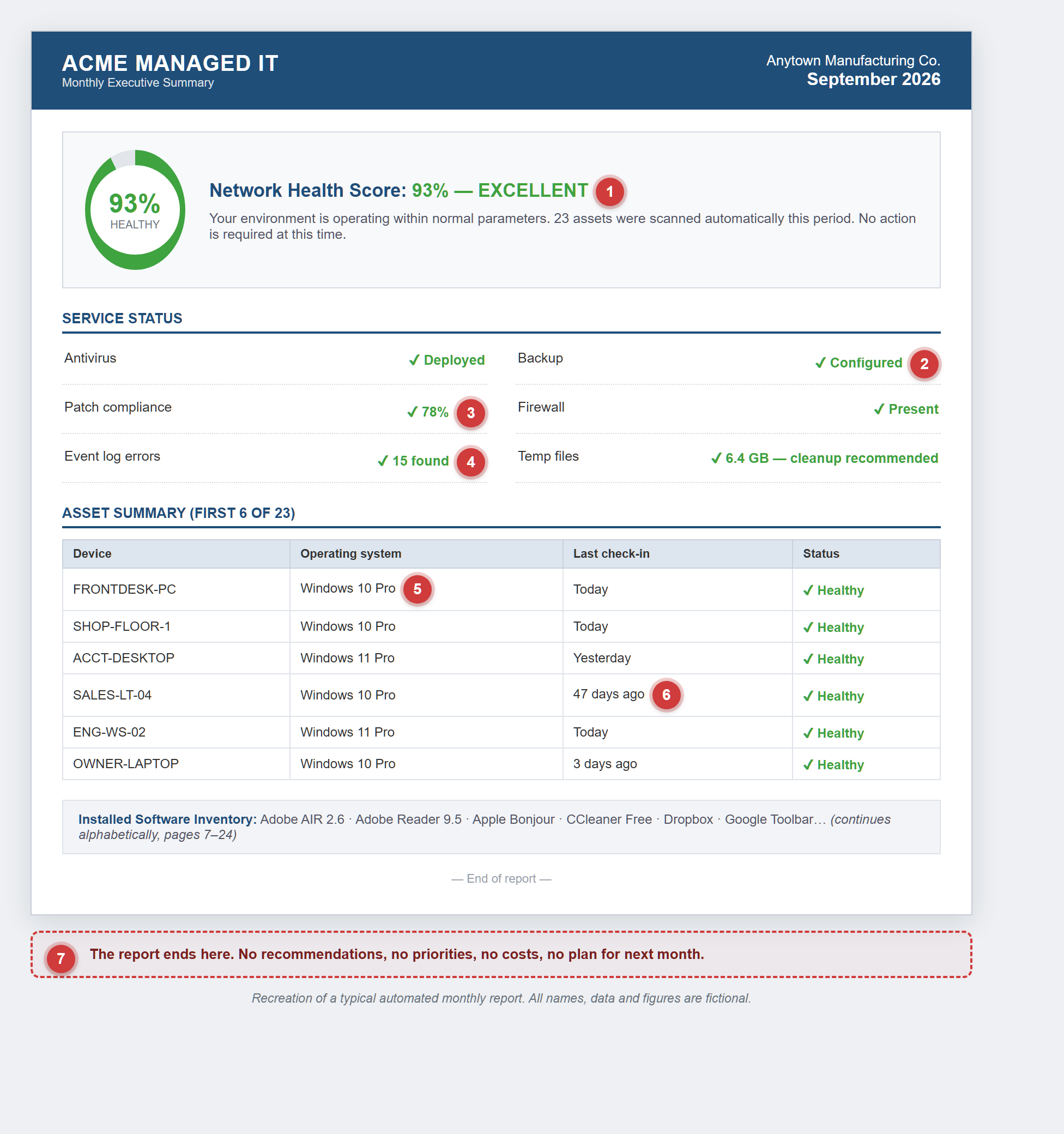
Recreation of a typical automated monthly report. All names, data and figures are fictional.
- 1A grade with no method behind it
93% of what? In this report, machines that stopped getting security updates months ago still count as healthy. If nobody can explain how the score is calculated, it isn't telling you anything.
- 2Status is not evidence
“Deployed” and “Configured” just mean the software is installed. They don't tell you it ran. A backup line with no date for the last successful backup says nothing about whether your files could be restored today.
- 3The missing 22% is the report
“78% patched” gets a green check. Which five machines are behind? Why? What's the plan for them? That is the part you actually needed to know.
- 4Errors with a green checkmark
Fifteen event-log errors get the same green check as everything else. When everything is green, the color stops meaning anything.
- 5End-of-life systems marked “Healthy”
Windows 10 stopped getting security updates in October 2025. Four of the six machines shown can't receive security fixes anymore, yet every one of them is listed as Healthy.
- 6A ghost machine
A laptop that hasn't checked in for 47 days is lost, broken, sitting in a drawer, or off the network. Whatever it is, it isn't Healthy. Nobody flagged it.
- 7No “so what”
The report ends with no recommendations, no priorities, and no costs. Twenty-four pages later, you still don't know what to do next.
Five questions to ask about your report
You don't need to be technical to hold a report to a standard. These five questions do it for you, and a provider doing real work will be glad you asked.
Ask your provider what would make the number go down. If nothing on today's report would move it, it isn't measuring anything.
You want a dated last successful backup for every machine, not the word “Configured.”
Systems past end of support and 8-to-10-year-old hardware should be named, with a recommendation and a rough cost. They shouldn't be hiding inside a green average.
Data isn't advice. A useful report ends with the three to five things worth doing next, in order, with what they cost.
A monthly report should be written for the owner, not for another technician. If you need an interpreter, it isn't really a report.
What a report should look like
Our monthly IT health report answers all five questions on page one. The health scores show the exact count behind every number. Backup appears as dated evidence for each machine. Every computer is listed with its age and status, and the report ends with a short list of recommendations in plain English. It is built from live monitoring data, then reviewed and written up by the same person who does the work.
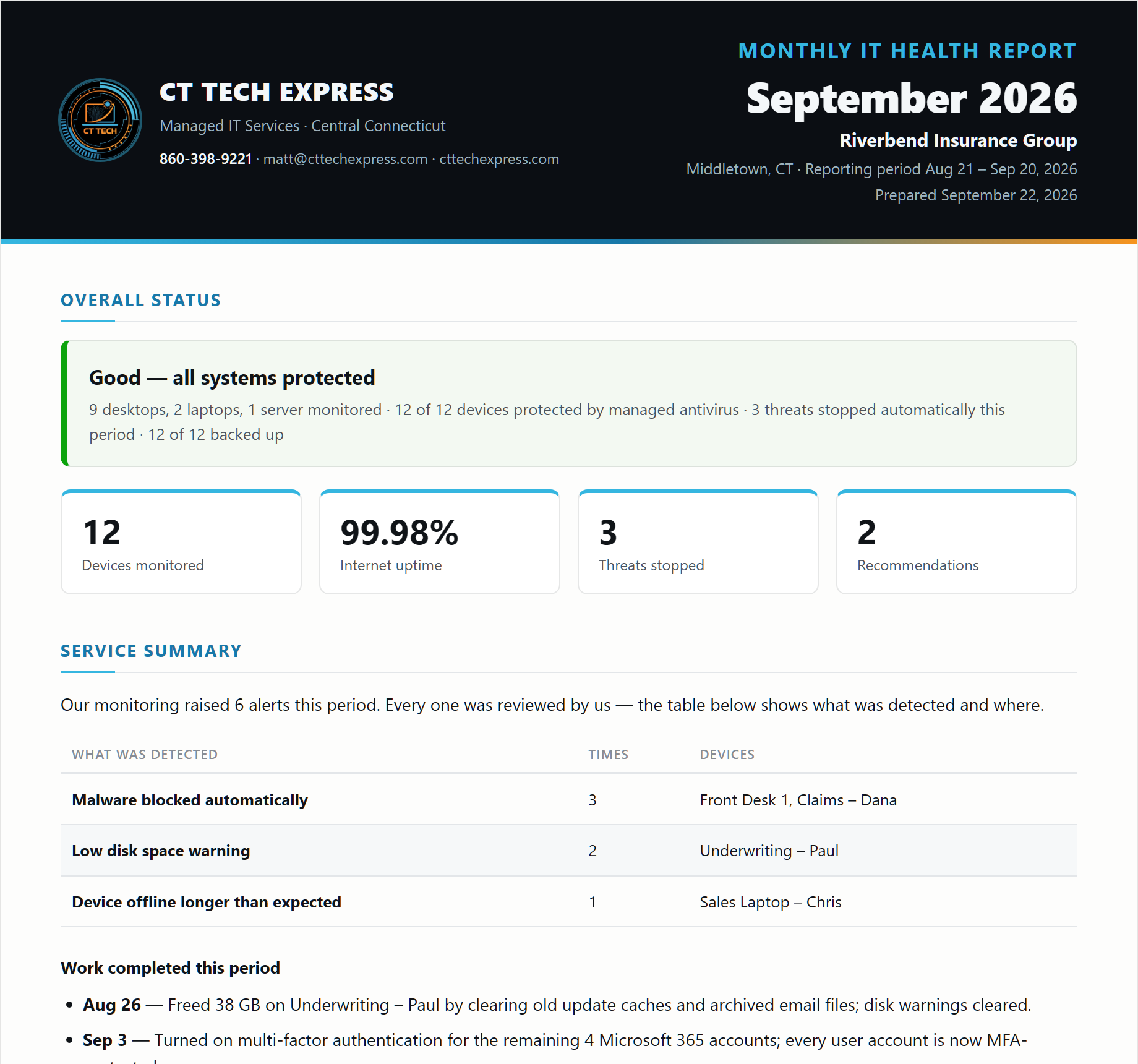
Page one of our sample report. Fictional client and data.
Already get a monthly report from your current provider? Bring it in for a free, no-obligation review. We'll go through it with you against the checklist above and tell you honestly what it shows and what it leaves out. If it holds up, we'll say so.
Call (860) 398-9221